Why Messages still has no archive function, and what to do instead
You have a thread you have finished with and do not want to lose. Perhaps a house move, a job that ended, a relative who has died. You want it out of the list without it being gone. Mail can do this. Slack, WhatsApp and Gmail can do this. Messages offers delete, and nothing else.
People have been asking about this for a decade and the answers have not improved. This page explains what the gap actually is, why the obvious workarounds do not fill it, and what a working alternative looks like.
What archive means, and what Messages offers instead
Archive is a specific idea: move something out of the active view, keep it complete, keep it searchable. The point is that removing something from your attention and removing it from existence are different actions, and a good tool separates them.
Messages gives you three controls, and none of them is that.
- Delete a conversation. It is removed, and with Messages in iCloud switched on, it is removed everywhere you are signed in.
- Keep Messages, set globally to Forever, One Year or 30 Days. It applies to every conversation at once and cannot be set per person.
- Recently Deleted, which holds deleted threads for around 30 days and then empties itself. A grace period, not a destination.
So the choice is keep everything in the list, or lose it. There is no third option, and the third option is the one most people actually want.
Get rid of everything once it has been acted on, but do not delete it. That is what archive means, and it is the one thing Messages will not do.
Why the retention setting is not an archive
Keep Messages looks like the answer until you look at what it controls. It is a single global rule with three values, applied to every conversation you have ever had.
- It cannot keep one thread and prune the rest, which is the actual request almost every time.
- Set to anything but Forever, it deletes on a rolling basis, quietly, without asking, and without telling you what went.
- Set to Forever, nothing is archived, it is simply all still there, which is the state you were trying to get out of.
There is also a trust problem. Threads on Apple’s support forums repeatedly report the setting appearing to change on its own after an update, or messages disappearing while it was set to Forever. Whatever the cause in each case, the effect is that people no longer treat the setting as a guarantee, and a retention control you cannot rely on is not a place to keep something irreplaceable.
Why iCloud is not an archive either
This is the most expensive misunderstanding in the whole subject, and it is easy to arrive at honestly, because Messages in iCloud sounds exactly like a backup.
It is sync, not backup. Its job is to make every device show the same thing. When you delete a conversation on your phone, sync is working correctly when that conversation vanishes from your Mac and your iPad within seconds. It propagates the deletion, because propagating changes is the entire feature.
The difference in one line
A backup keeps a copy of what things used to be. Sync keeps every copy identical to what things are now. Only one of those helps after a mistake.
Paying for more iCloud storage does not change this. It buys room for the current state to be larger. It does not add history.
The workarounds people try
Screenshots
Reliable, and does not scale. A few dozen images cover a short exchange. Nobody screenshots eight years of a thread, and the result is not searchable, so finding one message later means scrolling images.
Print the thread to PDF
On a Mac, File then Print then save as PDF genuinely works and produces something readable. On long threads it also frequently stalls or quits, because the app has to load the entire conversation before it can print. People end up printing in page ranges and merging in Preview. The threads worth archiving are exactly the long ones, so this breaks precisely where it is needed.
Leave it and mute it
Hiding alerts removes the notifications and leaves the thread in the list. It is the closest thing built in, and it addresses attention without addressing storage or safety. The conversation is still one accidental swipe from Recently Deleted.
Copy the Messages folder
Technically the most complete option. Everything is in a SQLite database at ~/Library/Messages/chat.db, along with an Attachments folder. Copying it is harder than it looks: recent messages can still be sitting in a write ahead log file beside the database, the attachments are stored separately and referenced by path, and the timestamps use Apple’s own reference date rather than normal Unix time. A naive copy can be missing the newest messages and all the pictures, and read as though it were from 1970.
What an archive actually needs to do
Working backwards from the requests people make, the list is short and none of it is exotic.
- Hold the full history, including threads no longer on any device.
- Stay outside the Messages app, so a deletion or a sync event cannot reach it.
- Be searchable across every year at once, or it is storage rather than an archive.
- Keep the metadata: who, when, which service, which attachments.
- Let one conversation come back out as a file, so it can be given to someone.
How Message Archive handles it
Message Archive is a Mac app that copies your history into a separate archive on your own machine. It reads the Mac’s message database and any iPhone backups it can find, merges them, and keeps the result independent of Messages. Deleting a thread in Messages afterwards does not remove it from the archive, which is the entire point.
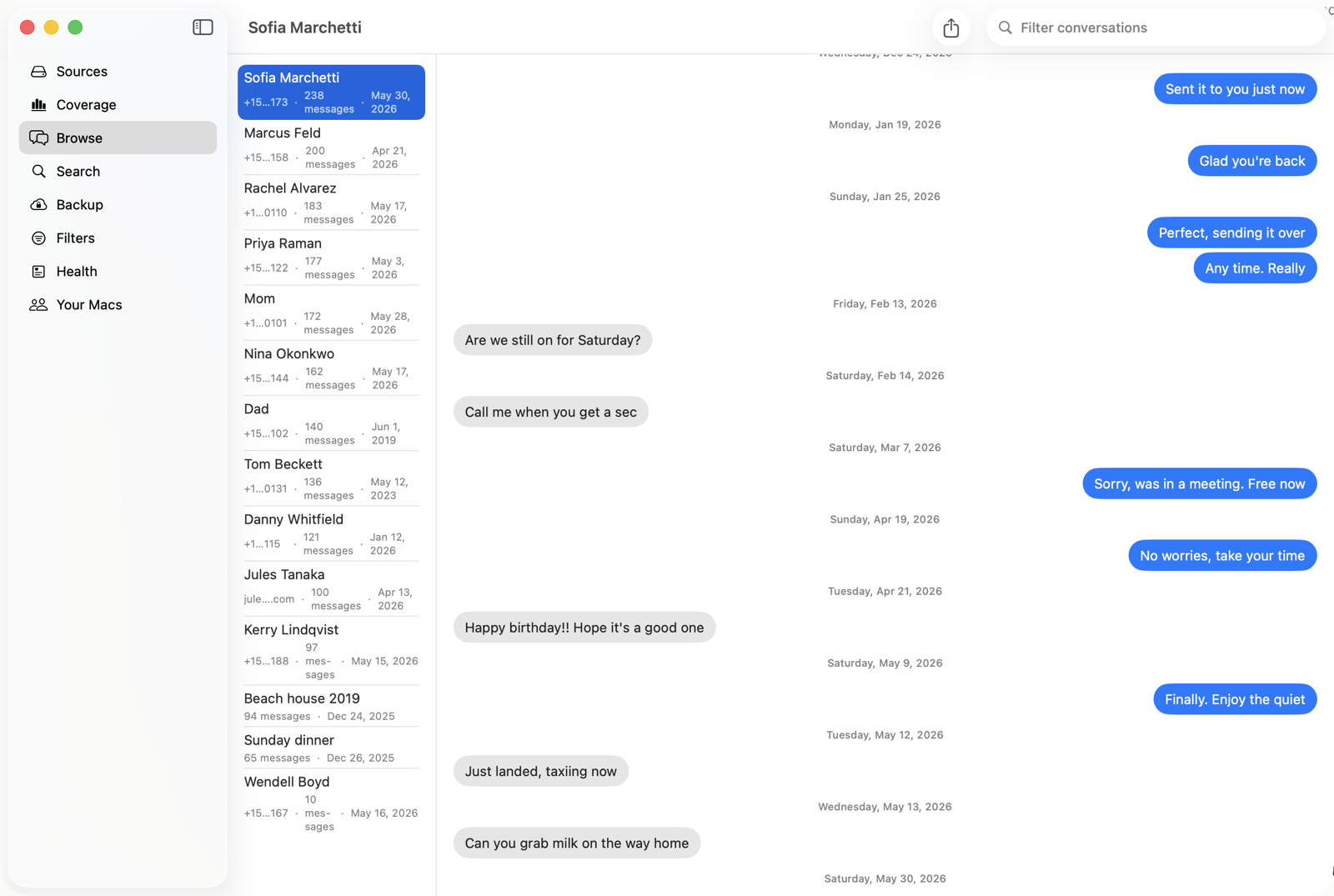
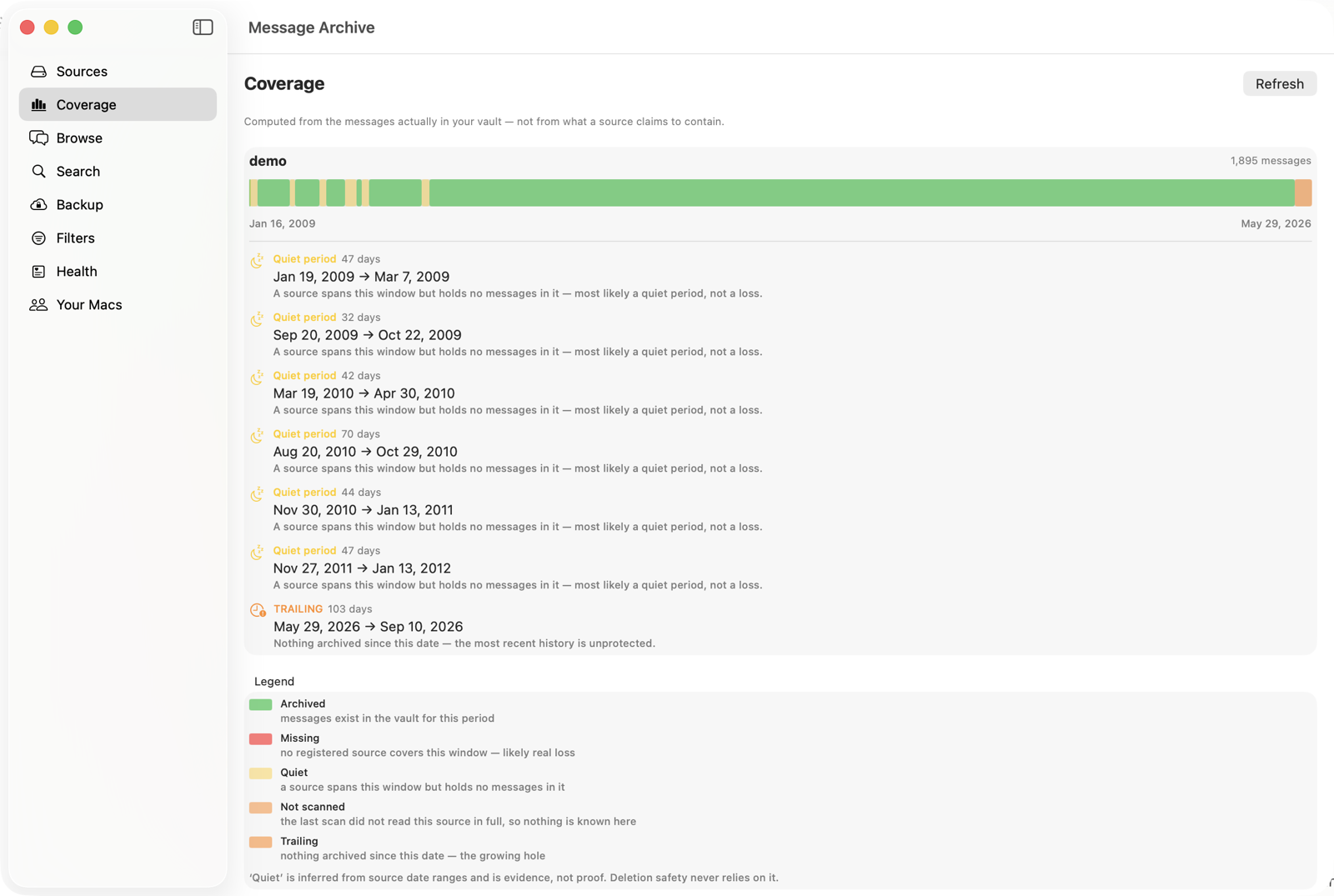
Because it merges sources rather than mirroring one, it can also show you the shape of what you have, including the periods nothing covers. A gap you know about is a different problem from a gap you do not.
Any single conversation can be exported as PDF, CSV or JSON, with a seal recording the file’s fingerprint and an independent timestamp. That matters less for a sentimental thread than for a disputed one, and it costs nothing to have.
The honest limit
This cannot recover what is already gone. If a thread was deleted, is not in any backup, and is not on any device you still own, no software can bring it back. An archive is a thing you start before you need it, which is an unsatisfying answer and the true one.
It costs $47 a year for one Mac. Before spending anything, it is worth opening the Keep Messages setting on your phone and checking what it says, because if it is not on Forever, history is being deleted right now, and that is free to fix.
The short version
- Messages has delete and a global retention setting, and nothing in between.
- Keep Messages applies to everything at once and cannot spare one thread.
- iCloud syncs deletions rather than protecting against them, so it is not a backup.
- Printing to PDF works and breaks on exactly the long threads worth keeping.
- A real archive lives outside the app, holds every year, and stays searchable.
- Check your retention setting first. That part is free.
Common questions
Can you archive a conversation in Messages on an iPhone or Mac?
No. As of 2026 there is no archive function in Messages on any Apple platform. You can delete a conversation, hide its alerts, or change the global Keep Messages setting. There is no way to move one thread out of the list while keeping it.
Does hiding alerts archive a conversation?
No. Hiding alerts stops notifications and leaves the conversation exactly where it is. It changes what interrupts you and nothing about whether the messages are safe.
If I delete a conversation, can I get it back?
For about 30 days, yes. Deleted conversations move to Recently Deleted and can be recovered from there. After that window they are removed, and if Messages in iCloud is on, the deletion has already reached your other devices.
Does Messages in iCloud back up my messages?
It syncs them, which is a different job. Sync makes every device match, including matching a deletion. It protects you if a device is lost or broken and does not protect you from something being deleted, because it copies the deletion too.
Where are the messages stored on a Mac?
In a SQLite database at ~/Library/Messages/chat.db, with attachments in ~/Library/Messages/Attachments. Recent messages may still be in a chat.db-wal file beside it, which is why copying just the database can miss the newest ones.
What is the difference between an archive and a backup?
A backup is a copy of a whole system, kept so you can restore it after a failure, and it is usually overwritten as it ages. An archive is a permanent, searchable record kept because the contents themselves are worth keeping. For messages you want in twenty years, you want an archive.
Keep the history you still have
Message Archive merges the messages on your Mac with the ones in your iPhone backups and keeps them in a vault outside the Messages app, where nothing can prune them. It reads your Messages database read only and everything stays on your machine.
$47 per year, per Mac. 14-day free trial. Cancel any time. Requires macOS 14 or later.
Weighing it against something else? We keep honest comparison pages, including the parts where the other tool is the better buy.
Read next
Why macOS deletes your old messages, and how to stop it
macOS is set to throw away message history on a timer, and the setting is easy to miss. Here is what actually removes your old texts, how to check your own Mac in under a minute, and how to keep the history you still have.
Keep Messages is set to Forever and messages still disappeared
Forever is a real setting and it does work, but it only governs one kind of deletion on one device. Here are the six other things that remove messages regardless of it, how to tell which one hit you, and what to do about each.
How to preserve text messages before a dispute
A step by step guide to stopping the automatic deletion of text messages, making a second copy that is not on your phone, and producing a record you can hand over later. Written for the point before anybody has asked you for anything.